Habit tracker printable: a free monthly or 30-day habit grid
Type your habits, choose a month or 30 days from any date, and print a one-page grid with a box for every habit on every day. Save it as a PDF from the print dialog, or tick the boxes right here. Free, no email, and nothing you type leaves your browser.
Updated
Free. No email, no sign-up. Letter or A4, landscape.
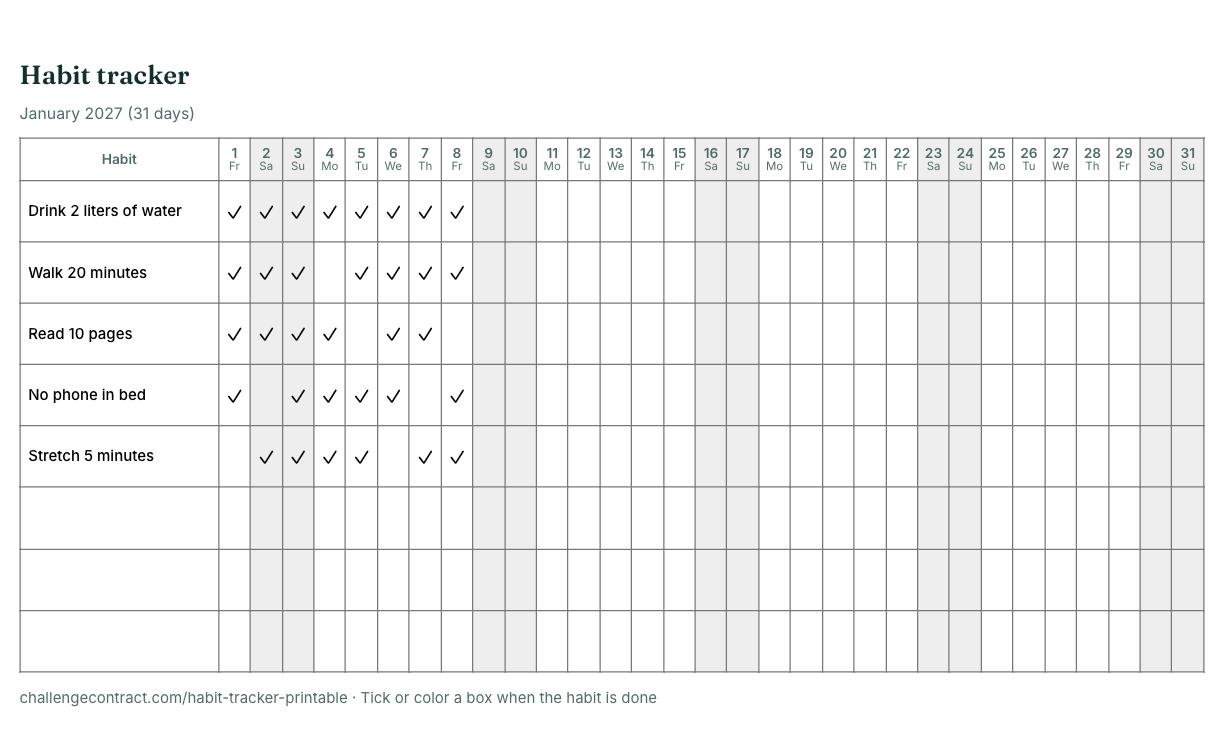
Printable monthly habit tracker
Up to eight habits. Leave a field empty for a blank row you can fill in by hand. Weekends are shaded once you pick a month or a start date. Tap a box to tick it on screen; your sheet is saved in this browser only.
Habit tracker
Month: ____________________
| Habit | 1 | 2 | 3 | 4 | 5 | 6 | 7 | 8 | 9 | 10 | 11 | 12 | 13 | 14 | 15 | 16 | 17 | 18 | 19 | 20 | 21 | 22 | 23 | 24 | 25 | 26 | 27 | 28 | 29 | 30 | 31 |
|---|---|---|---|---|---|---|---|---|---|---|---|---|---|---|---|---|---|---|---|---|---|---|---|---|---|---|---|---|---|---|---|
challengecontract.com/habit-tracker-printable · Tick or color a box when the habit is done
Use Save as PDF in the print dialog for a file.
How to use a habit tracker that you will keep using
- Start with two to five habits. A short list you complete beats a long list you abandon in week two.
- Make each habit a yes-or-no action. "Walk 20 minutes" is easy to tick; "be healthier" is not.
- Put the sheet where you end the day, on the fridge, a desk or next to your bed, and tick it every evening.
- Never miss twice. One blank box is a normal day. Two in a row is where habits usually stop, so make the next day count.
- Review at the end of the month. Keep the habits that stuck, drop or shrink the ones that did not, and print next month.
Habit tracker ideas
- Health: drink 2 liters of water, walk 8,000 steps, stretch 10 minutes, no sugary drinks, in bed by 11pm.
- Mind: read 10 pages, five minutes of quiet, write three things you are grateful for, no phone for the first hour of the day.
- Money: no takeout, log every purchase, move $5 to savings.
- Home: make the bed, clear the sink before bed, ten minutes of tidying.
Want one habit with a plan behind it? These 30-day challenges come with rules, a calendar and a tracker: water, reading, gratitude, digital detox and declutter.
Prefer to track on your phone?
The free challenge tracker turns the same habits into a daily checklist: pick 21, 30, 66 or 90 days, add your habits, and tick them off each evening. It shows your streak and perfect days, prints a matching calendar and keeps everything in your browser, with no app or account. For a fixed length with a signed contract, start from the custom challenge builder.
| This printable | Online challenge tracker | |
|---|---|---|
| Length | A calendar month, or 30 days from any date | 7 to 366 days from any start date |
| Habits | Up to 8 rows | Your list of daily rules |
| Streaks and reminders | You count by eye | Streak count and calendar reminders |
| Where the data lives | On paper, or ticks saved in this browser | In your browser, on your device |
How long should you track a habit?
A month is a good first block, but many habits take longer to feel automatic. In a 2010 study of 96 volunteers, Lally and colleagues found a median of 66 days for a new daily habit to become automatic, with a range of 18 to 254 days. Print a fresh sheet each month and keep the habits that matter until they no longer need a box.
More trackers and challenges
Questions
Is this habit tracker printable free?
Yes. Type up to eight habits, choose a month or 30 days and print the grid, or pick Save as PDF in the print dialog to keep a file. There is no email, sign-up or watermark, and nothing you type is sent anywhere.
How many days does the monthly habit tracker have?
It matches the month you choose: 28 days for February (29 in a leap year, such as February 2028), 30 for April, June, September and November, and 31 for the other months. Choose the blank month option for a 31-day grid you can date by hand, or the 30-day layout to start on any date.
Can I make a 30-day habit tracker that starts today?
Yes. Set Layout to 30 days instead of Calendar month and pick the start date. The grid shows 30 columns with the real dates and weekdays, and it can run across two months or into the new year, for example December 15 to January 13.
Can I tick the habit tracker online instead of printing it?
Yes. Tap a box to tick it and tap again to undo. Your habits, dates and ticks are saved in this browser only, so the same sheet is there when you come back on this device. Printing keeps your ticks, and Clear ticks empties the sheet.
Does it print on US Letter and A4 paper?
Yes. Choose Letter or A4 and print in landscape. Only the habit grid is printed, without the page around it, and Save as PDF in the print dialog gives you the same one-page sheet as a file.
How many habits should I track at once?
Fewer than you think. Two to five daily habits are easier to keep honestly than ten, and a short list makes a missed day obvious. The sheet has room for eight rows; leave some blank or use them for habits you only track on certain days.
What habits can I put on a habit tracker?
Small, daily, yes-or-no actions work best: drink 2 liters of water, walk 20 minutes, read 10 pages, no phone in bed, stretch for five minutes, write one line in a journal, no spending on takeout, lights out by 11pm.
Is there a 30-day habit tracker that works on my phone?
Yes. The challenge tracker on this site turns your habits into a 30-day (or 7 to 366 day) daily checklist in your browser, with a streak count and a printable calendar. It needs no app download or account and keeps your check-ins on your device.
How long does it take to form a habit?
It varies a lot. In a 2010 study of 96 volunteers by Lally and colleagues, the median time for a new daily habit to feel automatic was 66 days, with a range of 18 to 254 days. A month is a good first block; keep going after it.